This glossary covers the essential terms you need to navigate and understand MyAi. Each term links to the page where it’s explained in depth.
What is a Mirror Pair?
A Mirror Pair is the foundational concept in MyAi: a collaborative bond between a human and an AI that learns to think like them. Your Mirror is not a generic chatbot — it is a personalized AI partner that understands your role, your expertise, and your organizational context.
The Mirror operates through Dimensions — specialized workspaces that scope what the AI knows and can do. As you work with MyAi, your Mirror refines its understanding through reflection, building a persistent model of your judgment and expertise that can be scaled across your organization.
The Mirror Overview is your home dashboard, showing your favorited Artifacts, active Workflows, and recent conversations.
What are Dimensions?
Dimensions are secure, isolated workspaces within MyAi. They act as hard boundaries for specific context, tools, and data, ensuring that an AI operating in one Dimension has no awareness of the information in another. Think of them as dedicated command centers for specific departments or projects.
Content is added to a Dimension to define what the AI knows and can do. This content includes Skills, Artifacts, and Workflows.
Learn more: How MyAi Works — Architecture
What are Artifacts?
Artifacts are the universal building blocks of MyAi. Everything in the system — documents, reports, automations, functions, templates, and even this page — is an Artifact. They are designed to be self-contained and easily manageable.
Learn more: Pro User Guide — Artifact Lifecycle
What are Canvases?
Canvases are interactive reports, dashboards, and living documents. They allow you to visualize data and interact with the system without writing code. Because Canvases are Artifacts, they serve as persistent memory, ensuring your work outlives a single chat session.
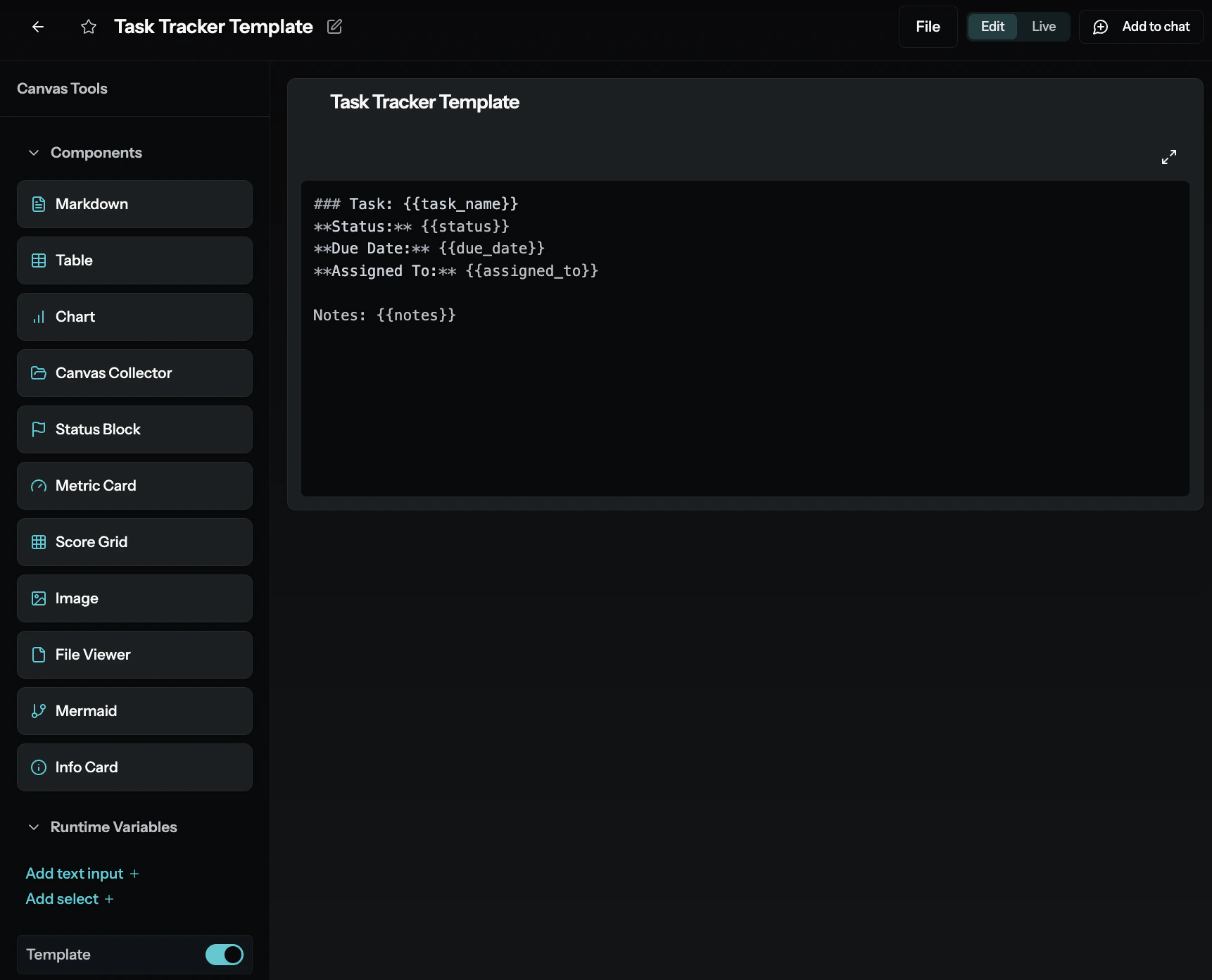
Templates vs. Canvases: Templates define the data structure (the “blueprint”) — use them when you need to capture structured records. Canvases define the data presentation (the “dashboard”) — use them when you need to visualize, report on, or interact with those records. Notice the Template toggle in the bottom-left of the editor — that’s how you know you’re looking at a Template rather than a Canvas.
What are Skills?
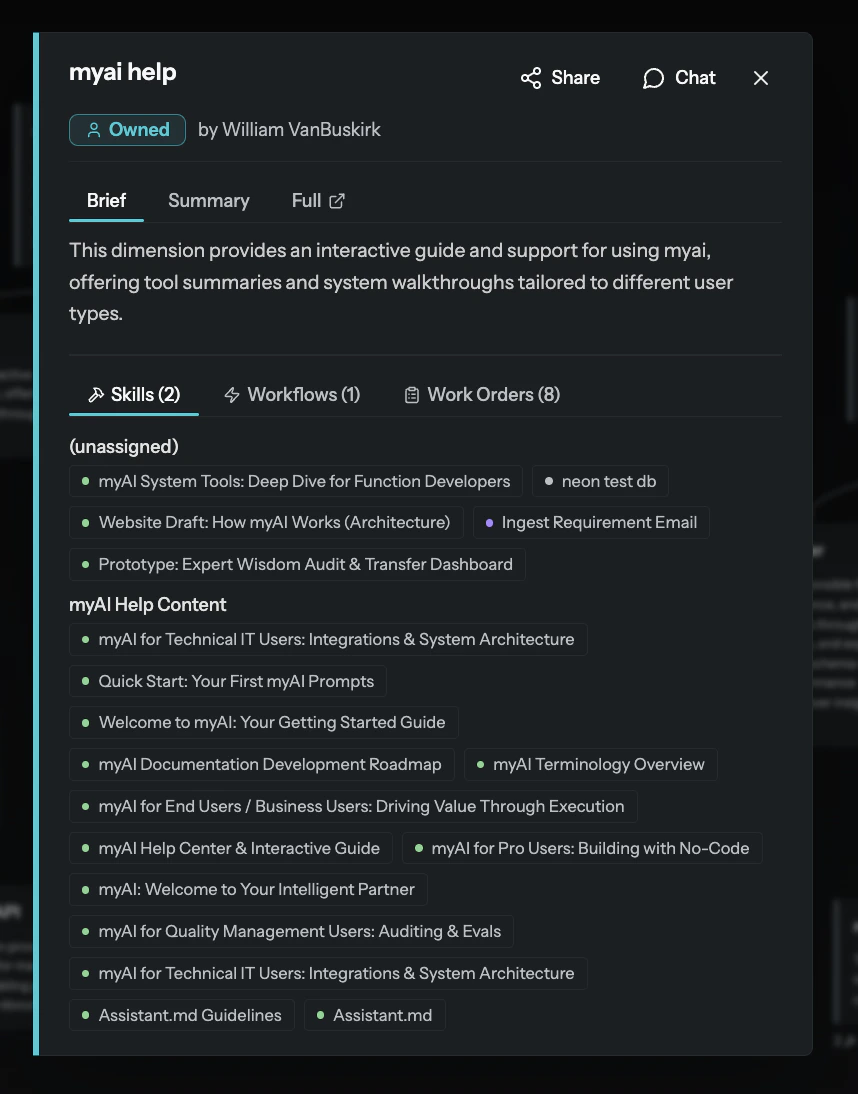
Skills are named collections of capabilities that can be applied to Dimensions. A Skill groups related content under a meaningful name — this content can include Canvases, Functions, or other Artifacts.
When a Skill is mapped to a Dimension, it gives that Dimension specific information about what tools and knowledge to use. Skills are the mechanism by which Dimensions gain their specialized capabilities.
Skills are cross-dimensional. If both your Sales and Marketing Dimensions need to access your CRM, you create one Skill (e.g., “CRM Integration”) and apply it to both. The capability and code are shared, while the context (the data each Dimension sees) remains separate. Once you codify a process into a Skill, any Dimension can use it instantly.
Learn more: How MyAi Works — Skills
How do Skills and Functions relate?
Functions are reusable units of logic — Python-based code modules that can orchestrate tool calls (like api_client, sql_client), process data, and implement business rules. Functions are a type of Artifact.
Skills are named groupings that map content (including Functions, Canvases, and other Artifacts) to a Dimension. A Skill is not a Function itself — it is the container that makes Functions (and other capabilities) available within a specific Dimension.
Think of it this way:
- A Function is a tool (e.g., “query the CRM API and return pipeline data”).
- A Skill is a named bundle (e.g., “Sales Toolkit”) that contains that Function plus a related Canvas and Template, and is assigned to the “Sales” Dimension.
Learn more: Integrations — Custom Functions | IT User Guide
What are Workflows?
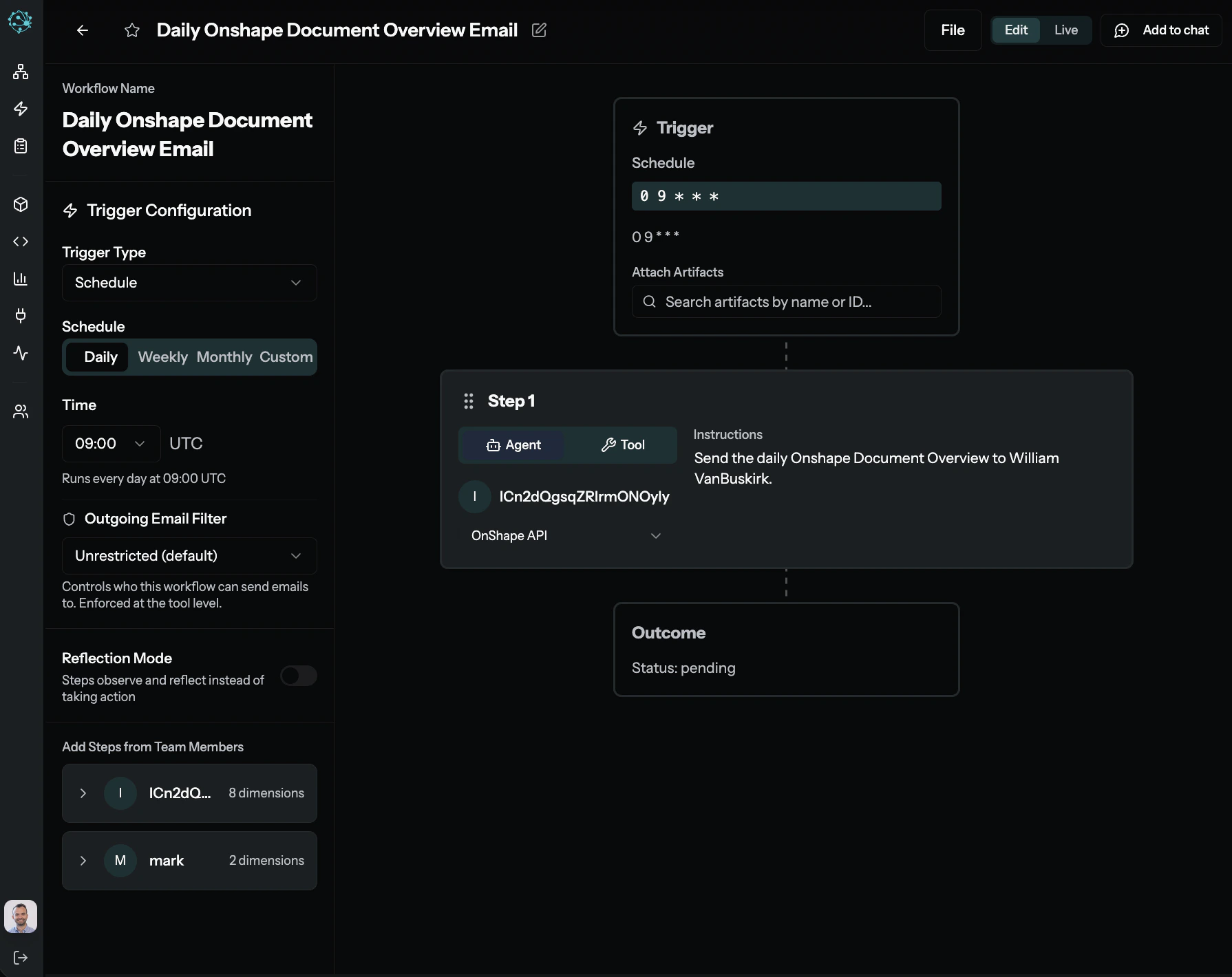
Workflows are repeatable processes that chain work across multiple Dimensions or tools — specifically, they are the steps that define what actions to execute. Each step can use an Agent or a Tool to perform work like querying a database, sending an email, or processing a file.
Workflows live inside Attunements, which control when and how the Workflow runs (triggers, scheduling, Reflection Mode, team assignments). Think of the Workflow as the recipe and the Attunement as the kitchen — the triggers, permissions, and operating mode that surround it.
Learn more: Integrations & Automation | Use Case Examples
What are Work Orders?
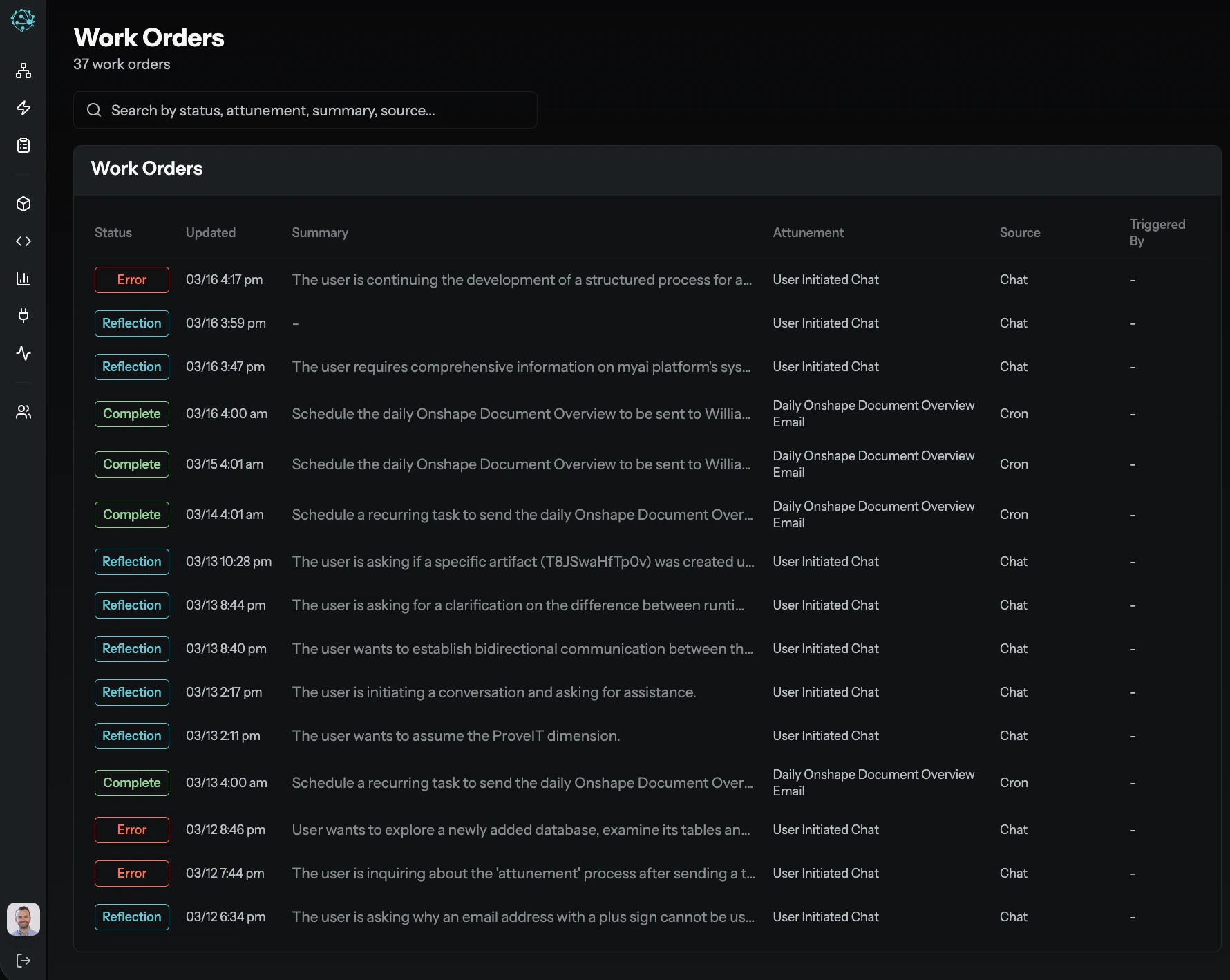
A Work Order is the execution record of a task in MyAi. Every task — whether initiated by a user, triggered by a Workflow, or invoked by an external system (such as a webhook or an email) — creates a Work Order that tracks:
- Initiator — Who or what started the task
- Instructions — The exact directive given
- Execution history — Step-by-step tool calls, inputs, and outputs
- Status and outcomes — Whether the task completed, failed, or requires review
Work Orders are MyAi’s audit trail. Quality teams use them for compliance monitoring, IT teams use them for system observability, and all users can review them to understand exactly what MyAi did and why.
Learn more: Quality Roles — Inspecting Work Orders | Reliability & Limitations
What is the difference between Reflection Mode and Standard Mode?
- Reflection Mode: MyAi acts as a thinking partner, helping to capture, refine, and scale your wisdom and experience. The focus is on understanding, aligning, and codifying knowledge.
- Standard Mode: This is the execution-focused mode where MyAi primarily performs tasks, automates actions, and delivers results based on established context.
What are Execution References?
Execution references are unique identifiers (exec_abc123, ref_xyz456) that represent the payload or result of a previous step or tool execution. They are a core mechanism for passing data seamlessly and securely between different parts of the MyAi system, including:
- Between workflow steps: The output of one step can be directly referenced as input for the next.
- Tool outputs: Results from tools (like
sql_client query results, api_client responses, or file_processor artifacts) can be referenced directly.
- Content in artifacts: You can embed a reference to dynamic content in a Canvas, and it will resolve to the actual data when the Canvas is loaded.
Why are they important?
- Data integrity: The exact payload travels intact — there’s no risk of corruption, truncation, or reformatting.
- Efficiency: You don’t need to copy and paste large amounts of data.
- Security: References handle access permissions, ensuring only authorized components can resolve the underlying content.
Always prefer passing a reference (exec_id or ref_id) over transcribing content when possible.
How do Global Variables and Runtime Variables work?
When working with Templates in MyAi, understanding variables is key to managing structured data:
-
Global Variables (
global_variables): These define the schema and hold the persistent data for an Artifact instance. Think of them as the columns in a database table and the actual values in a specific row. They are globally accessible and queryable, forming the basis of your structured data records.
Example: A Customer Template might have global variables for customer_name, email, and account_status. Each Customer Instance created from this Template stores values for these global variables.
-
Runtime Variables (
runtime_variables): These are temporary variables that can override a global variable’s value for a single render or execution. They are not persisted with the Artifact Instance. End users might interact with these via URL parameters or UI selections on a Canvas to dynamically filter or display data without changing the underlying saved record.
Example: A Sales Dashboard Canvas might have a global variable region set to North America. A user could apply a runtime variable region=Europe to see European sales data, but the Canvas’s original region value remains North America for future loads.
This distinction is crucial for building flexible and powerful data collection and reporting tools.
Learn more: Pro User Guide — Templates and Instances
What are Attunements?
Attunements are formal contracts between AI agents — think of them as Service Level Agreements (SLAs) for inter-agent delegation. They describe a specific capability or service that one Dimension offers to others, defining the expected inputs, outputs, and quality promises.
- Purpose: Attunements standardize how different parts of an organization can delegate work to each other reliably. While most AI agent architectures treat agents as isolated silos, Attunements allow a network of agents to delegate to each other without human hand-holding.
- Scaling judgment: By creating an Attunement, a human expert codifies a piece of their judgment into a reusable, scalable service that other Dimensions can leverage, ensuring consistent execution of specialized tasks.
Example: A “Sales Lead Qualification” Attunement might be defined by the Sales Dimension, detailing the criteria for a qualified lead. The Marketing Dimension could then use this Attunement to delegate lead qualification tasks, knowing exactly what to provide and what to expect back.
Attunements vs. Workflows: The Workflow is the steps — the sequence of actions to execute. The Attunement is everything around the steps: when it triggers (schedule, webhook, email), who can trigger it, whether it runs in Reflection Mode (observe and reflect) or Action Mode (execute), and which team members and Dimensions are involved.